FindPathNow is the free game that provides a unique twist on word search. Your goal is to find all the words on a path. It’s free to play, no login required. Try it out now at https://findpathnow.com.
Warning
This is a message
This is a message
Warning
This is a message
This is a message
Game Settings
Value must be between X and Y.
Value must be between X and Y.
Game Settings
Show Next Letter
Show Next Letters?
NoYes
"Yes" means that valid neighbors will be displayed.t
"No"means they will not.
Lower Case Letters
Use Lower Case Letters?
NoYes
"Yes" means that the puzzle can contain mixed case letters, not just Upper case
"No"means only Upper case letters are used.
Select Topic
Choose Topic
Select a topic from the list.
Reset Credit Count
Reset Credit Back to Zero?
NoYes
"Yes" means that your credit score will reset back to zero
"No"means you keep your score as-is.
Play with Chaser?
Use Lower Case Letters?
NoYes
"Yes" means that you will be chased
"No"means you are not.
HOW TO PLAY
FindPathNow is a twist on the classic word search game. Your objective is to find all the words on a path. Here is a quick summary on how to play:
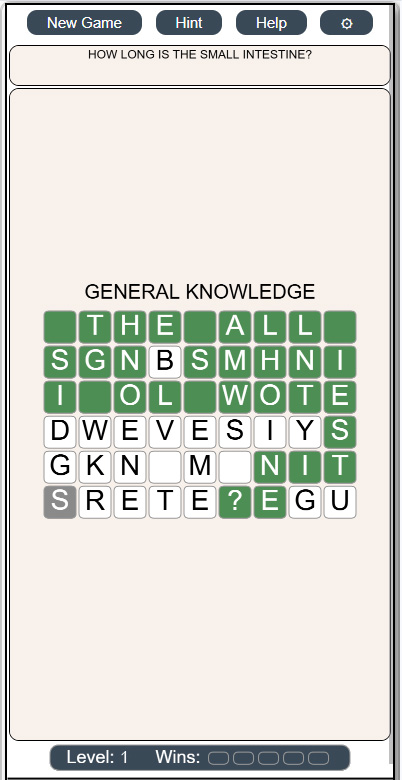
Getting Started: First game is pre-selected for you, so you are ready to go! The first letter is shown in the green cell, and your challenge is to find the rest of the words on the path that ends on the orange cell.
Winning: You win by correctly selecting all the cells on the path between the start cell and the end cell. If you are playing the timed game, then you have to do that before being caught.
More details are explained below.
SELECTING CELLS
There are four ways to select cells:
One-by-One: Just click on the next letter you think is on the path
Horizontal or Vertical: Sometimes you can see two or more letters all in straight line. Instead of clicking on each one, you can click at the end of the line, and all cells in between will be selected.
Corners: The nature of how the path is laid out often means that there are many corners to be taken. To make this easier to select, you can select any cell that is immediately diagonal (up-left, up-right, down-left, down-right) and the corner cells will be selected
Ask for a Hint: If you are stuck, then click on the Hint button on the top of the screen and the next letter in the path will be highlighted in orange. Note that you still have to click on that cell to continue
CELL COLORS
The colors used in the game have the following meaning:
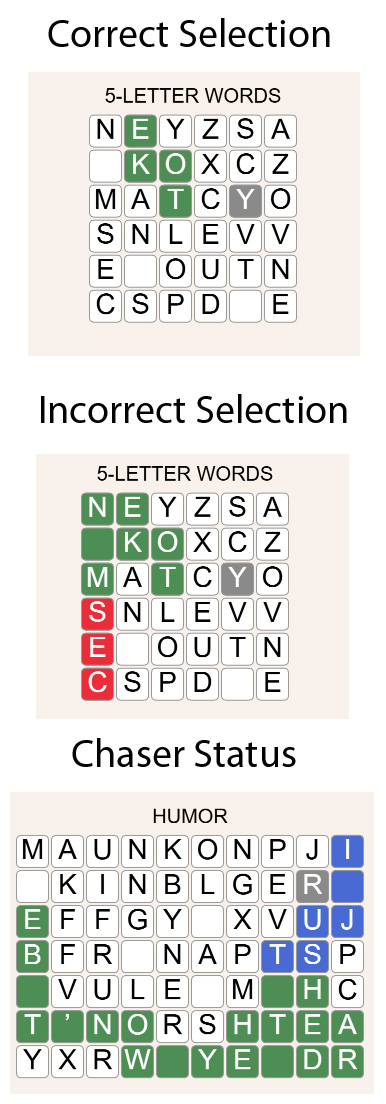
Green: Starting letter in the path. Green also represents which selected letter(s) is/are correct
Red: Selected letter(s) is/are incorrect. Note that the game will automatically undo an incorrect selection after one second.
Orange: Last letter in the path
Blue: If you are playing the Chased version of the game, then the blue cells are trying to catch up with you.
White: All other letters. These letters may or may not be part of the path.
SCORING
See which level you can reach! The scoring is as follows:
Win: You have found the whole path with one or fewer errors and no hints. Win count increases by one
Finished: You have found the whole path, but you made two or more errors and/or you needed a hint. In this case, your win count does not change
You get Caught: If you are playing the Chased version, then if you get caught, your win count goes down by one
Wins: More than five wins increases your level by one. Each time the level increases, the win count resets to zero
Levels: Reach as high a level as you can!
CHANGE TOPICS
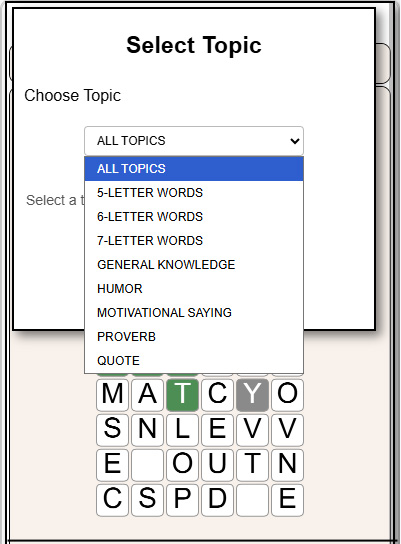
The default topic is "5-LETTER WORDS". If you like playing a particular topic (e.g. humor), then click on the "Settings" button at the top of the screen, then select "Choose Topics". There you will have a page that will show you the options and lets you select one. All games will be from that topic.
GAME VARIATIONS
There are two game variations:
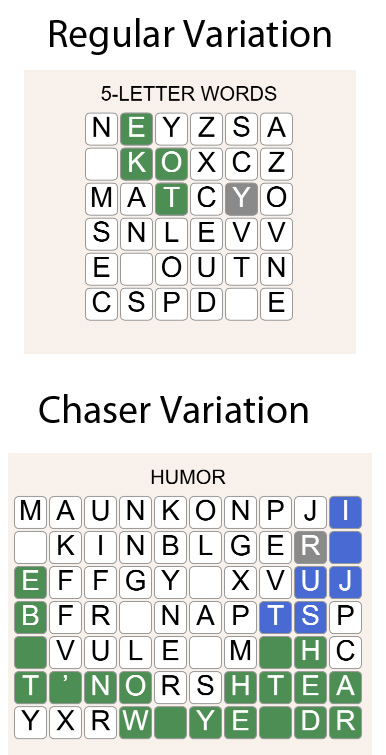
Regular: In this game variation, you have to find the path, but you are under no time pressure.
Chased: The variation is fundamentally the same as the Regular variation, but after your first click on a letter, a "Pacman" type process that will start moving from the first letter to the last letter in the path. Your challenge is to get to the end of the path without being caught!
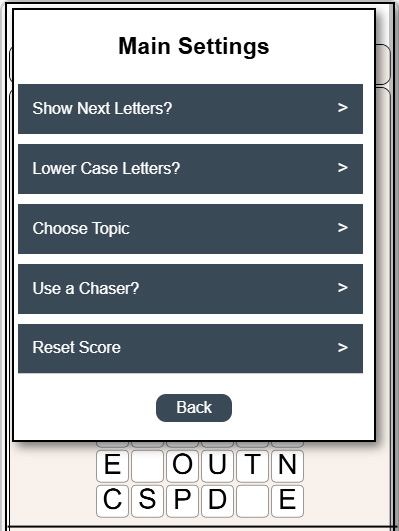
The game variation can be selected in the "Settings" menu. Click on the Setting button, then "Use a Chaser?" option. Selecting "No" chooses the regular game variation. Choosing "Yes" chooses the Chaser variation.
GAME SETTINGS
There are several different game settings:
Show Next Letters: Turning this one will let you see the valid neighboring cells that are next to the most recent selected cell. The cells are colored in orange
Lower Case Letters: By default, all the letters in the game are shown in Upper Case letters. If you prefer to see words as they would be written, then select Lower Case.
Choose Topic: Choose the topic from which the paths will be selected from
Use a Chaser?: Selected between Regular and Chased game variation
Reset Score: Resets your levels and wins back to (1, 0)
TIPS and TRICKS
There is only one suggestion to make at this time:
Each Word is Always Separated by a Space: Every word is separated by exactly one space. The same is true after special character like question mark (?) or colon (:). That can help at times if you are trying to map out a word